Trust & Security

Your documents stay in your world.

DocMan helps a loan processor move borrower documents from email into the borrower's folder in the processor's own Google Workspace, and tracks which required documents have been received. Here is exactly how your data is handled.

Your documents and loan data reside in your own Google Workspace, under your admin controls, retention, and DLP (Data Loss Prevention). Our service keeps no permanent copy of documents on its servers. Every connection is encrypted with TLS (Transport Layer Security).

Where your data lives

Two principles do most of the work: documents live in your own cloud, and the server keeps nothing durable.

DataWhere it lives
Document filesYour own Google Drive. They pass through our server only in-flight and are never stored on it.
Loan & borrower metadata, settingsYour own Google Drive, plus a short-lived server cache that is wiped on every redeploy.
OAuth (Open Authorization) refresh tokens, billing recordsOperator-controlled backup + ephemeral cache. Revocable by you at any time.
AI (artificial intelligence) feature inputOnly when you drop a lender PDF (Portable Document Format) on the optional agent, its text is sent to Anthropic's Claude API for parsing β€” not retained for training.

How data flows

Solid arrows are data movement. "In-flight" means it passes through the server but is not persisted on it.
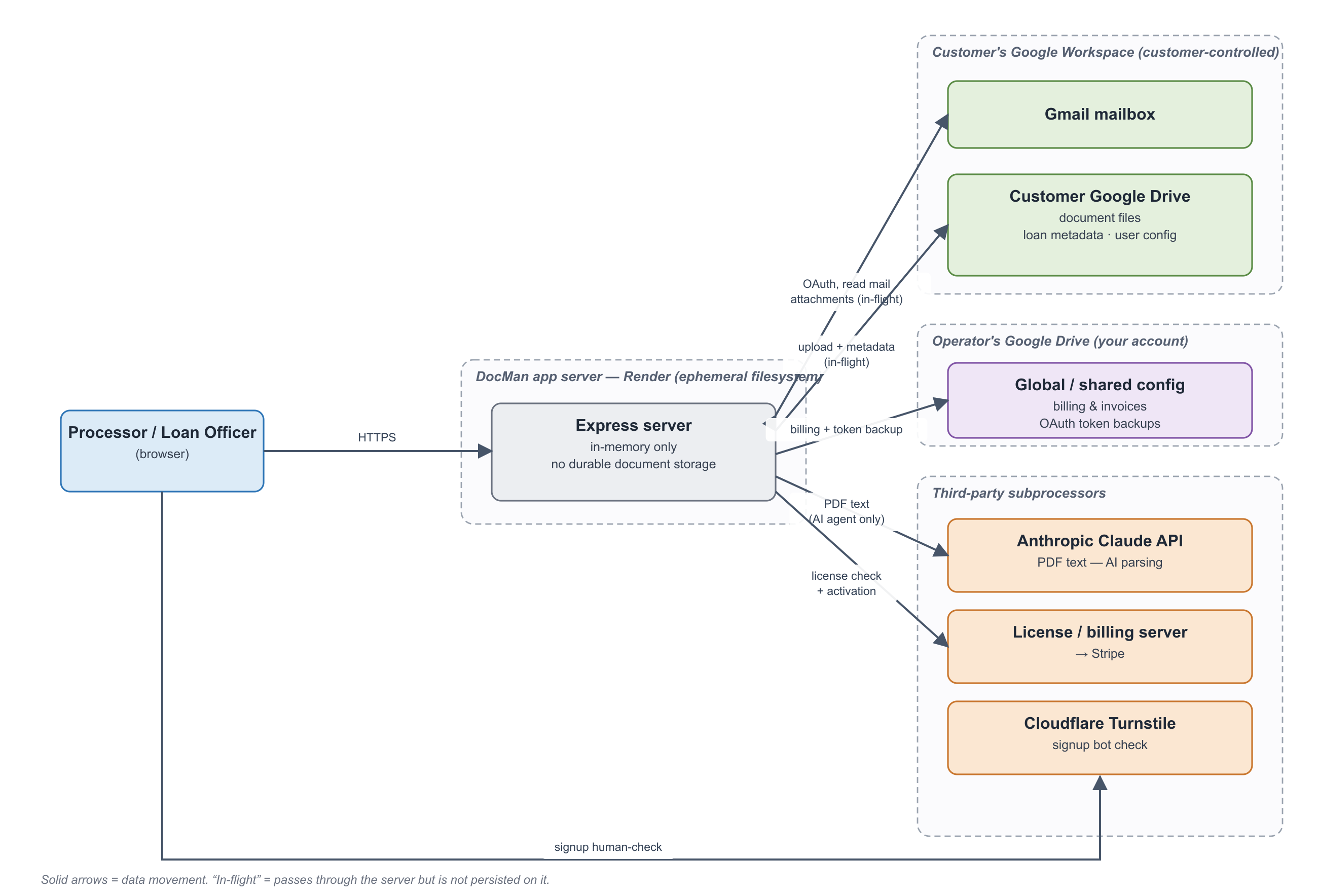
DocMan data flow: the user's browser and the DocMan server connect to the customer's Google Workspace, the operator's Drive, and third-party subprocessors.
Data-flow overview. The AI parsing path is the only route where document content leaves the Google / operator boundary, and it is opt-in per action.

Access is least-privilege

The permissions we request are the enforceable limit on what the app can touch β€” visible on the consent screen when you sign in.

πŸ”‘ Identity

Your email + basic profile, to identify the signed-in user.

πŸ“ Google Drive

To create the loan folder structure and move documents into your Drive.

βœ‰οΈ Gmail (modify)

To surface loan-related email and file it under a loan label. Cannot permanently delete mail.

βš™οΈ Basic Gmail settings

For send-as / signature handling on outbound status emails.

DocMan undergoes Google's OAuth verification / CASA (Cloud Application Security Assessment). Microsoft 365 support exists but is disabled by default.

Subprocessors

SubprocessorRoleData it receives
GoogleIdentity, Drive, GmailYour documents & metadata, within your own tenant
AnthropicOptional AI PDF parsingText of PDFs you submit to the agent; not retained for training
RenderApplication hostingData in transit + ephemeral cache; no durable document storage
StripeBilling (via license server)Email + activation counts; no documents
CloudflareSignup bot protectionA bot-check token; no document data

Security controls

Need the full packet?

The complete document set β€” data-handling overview, network-egress evidence, subprocessor list, and the Data Processing Addendum (DPA) β€” is available to your IT / security team on request. Leave your work email and we'll send a secure link.

Already received a secure link? Open it here.