Stop chasing
documents.
Start closing loans.

Drop a lender PDF and our AI agent builds the loan in seconds — extracting requirements, contacts, and the property address. DocMan tracks every required document against your Google Drive or your OneDrive, surfaces loan emails automatically, and gives borrowers and loan officers their own real-time portals.

Start your 60-day free trial → $50 per active loan after that · Cancel anytime · No setup fee
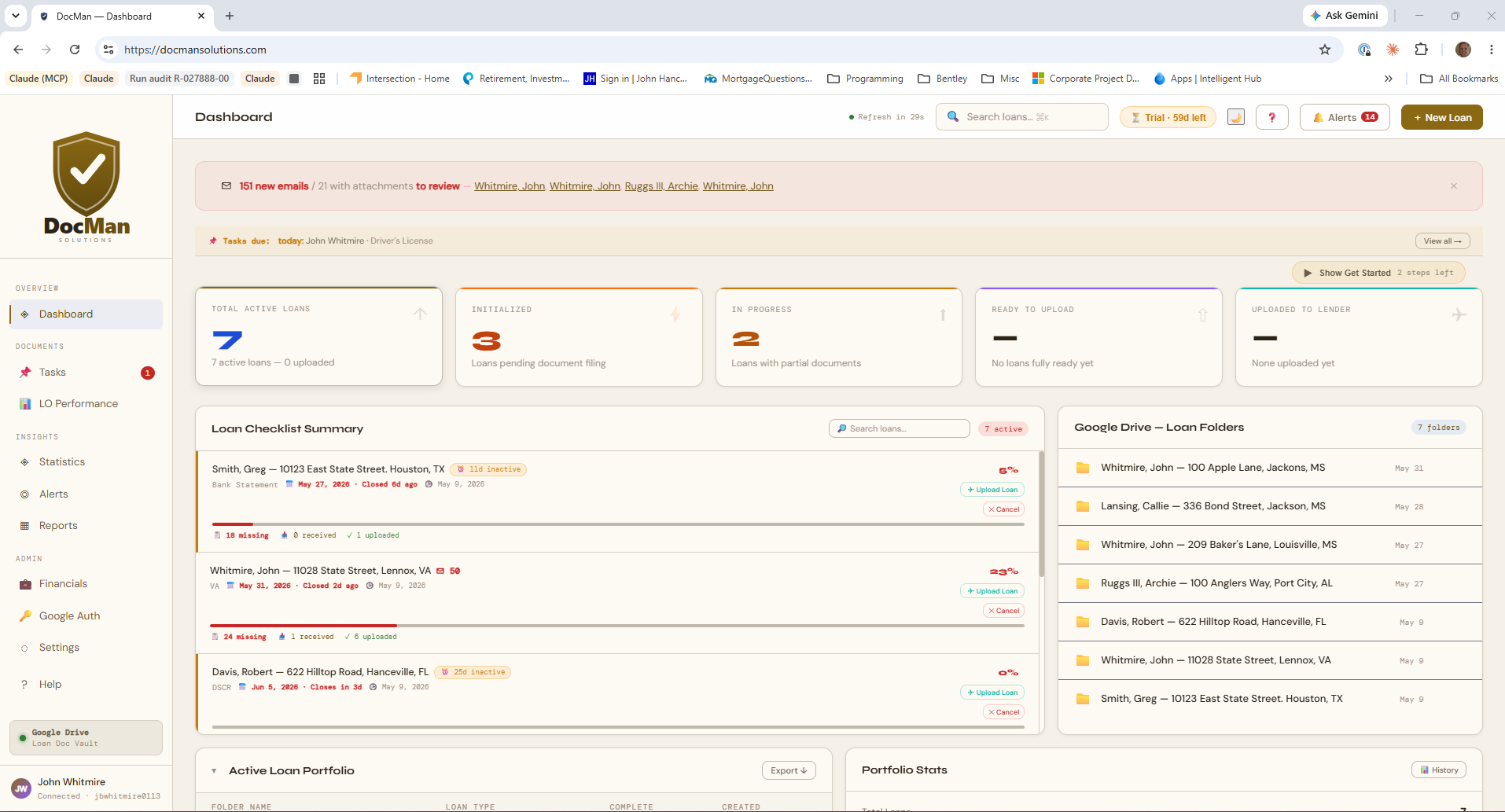
docmansolutions.com — Dashboard
DocMan Dashboard

Built for the people who move loans

Mortgage brokers, loan processors, independent lenders, title & closing companies, and contract processing firms — anyone tracking documents across many files at once.

From intake to closing in three steps

1

Create a loan folder

DocMan creates a structured folder in your Google Drive or your OneDrive for each loan with all required subfolders pre-built based on loan type.

2

Track documents in real time

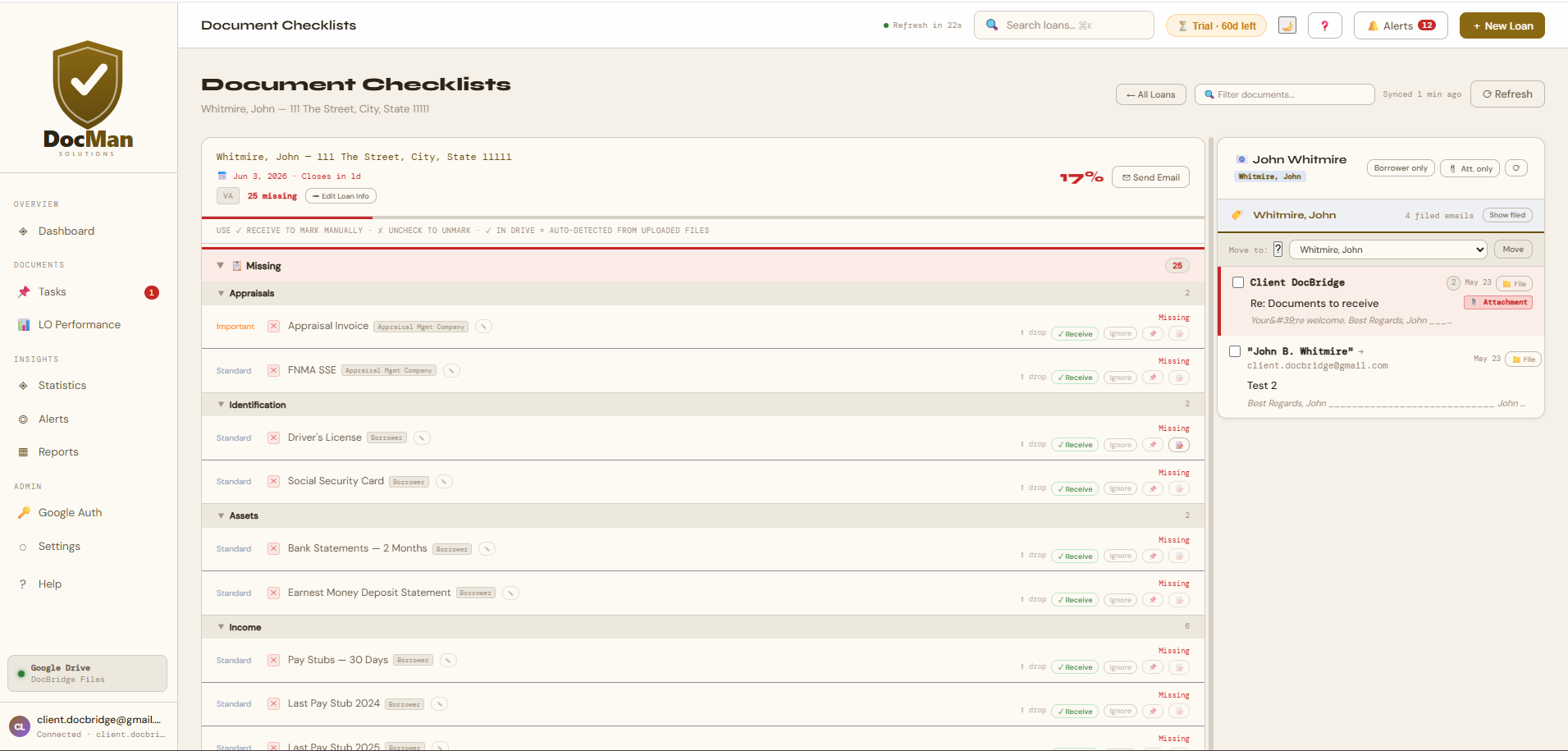
As documents arrive — filed from email or dropped into your Drive — the checklist updates automatically. Gmail attachments file with a single click.

3

Close with confidence

When all required docs are in, mark the loan as complete. Stale loan alerts and close-date warnings keep the pipeline moving.


File attachments without leaving your dashboard

DocMan connects to Gmail and surfaces every email related to each loan — from borrowers, loan officers, and title companies. Attachments are one click away from being filed directly into the right Drive folder.

  • Filters inbox to only show loan-relevant emails
  • Highlights messages from the borrower
  • Drag or click to file attachments into Drive
  • Creates Gmail labels per loan to keep threads organized
DocMan — Checklist
DocMan Gmail integration pane

Drop a lender PDF here
Conditional approval, term sheet, or program guideline
✓ Found 23 requirements · 💡 Lender + LO detected
CRITICAL W-2 — Two Years Borrower · Jane
CRITICAL W-2 — Two Years Borrower · John
IMPORTANT Bank Statements (2 months) Borrower
IMPORTANT Purchase Contract — Fully Executed Buyer's Realtor
+ 19 more …

Build the loan from the lender's PDF in seconds

Drop a conditional approval, term sheet, or program guideline onto the New Loan window. Our AI agent reads it for you — extracting the lender, loan officer, loan program, property address, and the complete list of required documents. What used to take 15 minutes of typing now takes 30 seconds of review.

  • Every requirement comes with the responsible party, importance level, and a verbatim quote from the source so you can verify each one
  • Multi-borrower loans: "each borrower must provide…" requirements fan out into per-borrower copies, each assigned to its specific person
  • Detects the lender and loan officer and offers to save them to your contact list with one click
  • Auto-populates the property address and loan program fields so the Create Loan button enables immediately
  • Suggests the right document group for each new requirement — your checklist stays organized
Give everyone their own window into the loan

Secure, read-only portals for loan officers and borrowers — no account required, no passwords to manage.

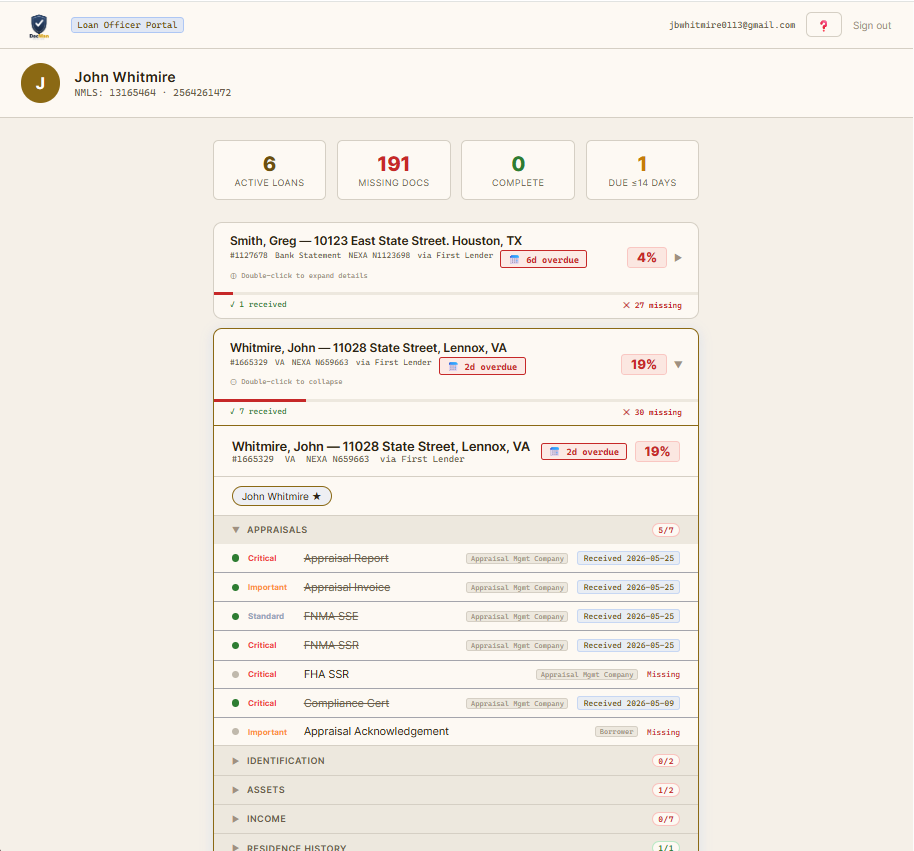
docmansolutions.com/lo
DocMan Loan Officer Portal

LOs see exactly where every loan stands

Send your loan officers a secure magic link — no passwords, no account needed. They get a read-only view of every loan assigned to them: document completion, close dates, and what's still outstanding.

  • One-click magic link — no account creation
  • Real-time document completion status
  • Close-date awareness and urgency indicators
  • Read-only — nothing can be changed

Borrowers always know what to send

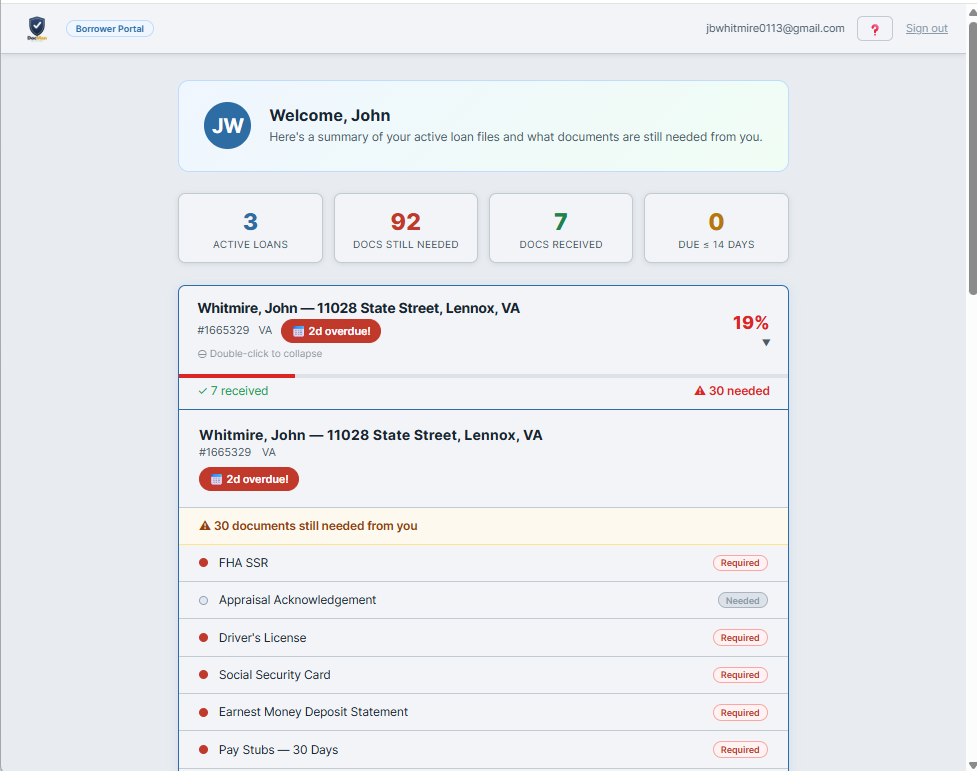
Borrowers enter their email and receive a secure link to a simple, mobile-friendly checklist. They see exactly which documents have been received and which are still needed — no phone tag required.

  • Email-based magic link — works on any device
  • Plain-language document names
  • Clear ✓ received / ✗ still needed status
  • Covers multiple loans automatically
docmansolutions.com/borrower
DocMan Borrower Portal

One subscription, every feature

AI Document Agent NEW

Drop a lender PDF on the New Loan window. Claude reads the document and pre-fills the requirements, contacts, property address, and loan program — multi-borrower support included.

📋

Smart Document Checklists

Required documents are defined per loan type (Conventional, FHA, VA, USDA, DSCR, etc.) and tracked against actual files in your Google Drive or your OneDrive in real time.

📧

Gmail & Outlook Integration

Every loan's inbox is filtered to surface only relevant threads. File attachments directly into the matching subfolder in your Google Drive or your OneDrive with one click — no tab switching.

☁️

Your Google Drive or Your OneDrive as Source of Truth

All documents live in your Google Drive or your OneDrive — organized automatically, accessible anywhere, and controlled by you. No proprietary file storage.

✉️

Scheduled Borrower Updates NEW

Send each borrower a recurring status email — daily, weekly, or on your schedule — with their current checklist progress. Borrowers always know what's outstanding without you having to chase them.

👥

Per-Borrower Assignments NEW

Multi-borrower loans, handled cleanly. Assign each document to a specific borrower; their portal and status emails show only what they personally owe.

⚠️

Stale Loan Alerts

Loans with no activity for more than 7 days are flagged with amber indicators on the dashboard, so nothing falls through the cracks.

📅

Close-Date Pipeline

Close dates are visible on every loan card, with urgency indicators as deadlines approach. The pipeline view shows all active loans by close date.

🔑

Self-Service Portals

Loan officers and borrowers get individual read-only portals via magic-link email — no accounts to create, no passwords to manage.


Your borrower data, protected by design

Verified by Google.
DocMan’s Google integration has completed Google’s official OAuth verification review.
Independently security-assessed.
Evaluated by a Google-authorized assessor against the OWASP Application Security Verification Standard.
🔑

Sign in with Google or Microsoft — no passwords

DocMan never creates, stores, or manages a password. Access is through Google’s or Microsoft’s own secure sign-in, so there’s no password for anyone to steal or leak.

🔒

Least-Privilege Access

DocMan can only see the files it creates for you — not the rest of your Google Drive or OneDrive. It cannot browse or read your unrelated documents.

☁️

Your Files Stay Yours

Documents remain in your own Google Drive or OneDrive, under your control. DocMan keeps no proprietary copies, and you can revoke access at any time.

🛡️

Encrypted In Transit & At Rest

All traffic is protected with TLS, and access credentials are encrypted at rest with AES-256-GCM, a widely trusted encryption standard.

🗄️

We Keep Only What’s Needed

DocMan doesn’t retain the contents of your emails or attachments, and never puts personal information in web addresses or logs.

🚫

Never Sold, Never Shared

Your data is never sold or shared, and never used for advertising or to train AI models — consistent with Google’s Limited Use requirements and Microsoft’s equivalent data-use policies.

A detailed architecture and security-assessment package is available on request to support your vendor-review process.


Questions, answered

Does DocMan replace my loan origination system (LOS)?

No — it complements it. DocMan is the document-tracking and borrower-communication layer that sits alongside your LOS, keeping every file in your own Google Drive or OneDrive.

Do I have to move my files into DocMan?

No. Your documents stay in your own Google Drive or OneDrive — DocMan organizes and tracks them in place, and you can revoke its access at any time.

Do borrowers and loan officers need to create accounts?

No. They get a secure link by email — no passwords, no sign-ups. The borrower and loan-officer portals are read-only, so everyone can see exactly which documents are still needed.

How does billing work?

Flat $50 per active loan, billed monthly, with a 60-day free trial. You only pay for a loan once it reaches Step 2 (requirements locked in and documents being collected). Loans you create and cancel don't count. Cancel anytime.

Is my borrower data secure?

Yes. Sign-in is through Google or Microsoft (no passwords stored), DocMan can only see the files it creates for you, and access credentials are encrypted at rest. Your data is never sold, shared, or used to train AI models. See Security & Trust for details.


Pricing

Pay only for the loans you work on

Flat $50 per active loan, billed monthly. Try free for 60 days — every feature unlocked, no card charged until day 61. Cancel anytime.

Free trial
Days 1 – 60
$0
Free, full access
Every feature unlocked. Card required at signup but not charged until day 61.
Pay per loan
Day 61+
$50 / loan
Billed monthly, only what you used
$50 per loan that reached active status this month. Quiet month = small invoice. Cancel anytime.
$50
per active loan · billed monthly · 60 days free
Start your 60-day free trial →

Cancel anytime · No setup fee · Pay by invoice (ACH)

Example monthly invoices
5 active loans
$250
12 active loans
$600
30 active loans
$1,500
50 active loans
$2,500
An "active loan" is one that's reached Step 2 — requirements list locked in and documents being collected. Loans you create and then cancel don't count.